


What you’ll learn after reading this article:
- Main terminology of Korean payments
- 2TR payment process used in Korea
- ‘Capture’ procedure
- 'Card Company App' payment method.
Terminology definitions
•
Authentication: The card company authenticates the identity of the card owner.
•
Authorization(Approval): The card company approves the authenticated payment request. Money is not yet transferred, and only the card's limit is debited.
Read more
•
Capture: Authorized payment data is submitted to card companies.
Read more
•
Settlement: Toss Payments transfers the payment received from card companies to the merchants after deducting PG usage fees.
Read more
Concepts
Let's understand the three essential concepts of card payments in South Korea, which are 2TR, capture, and ‘AppCard’.
1. How Toss Payments Transaction Steps Works?
In 2TR, authentication and authorization takes place in two separate steps. On the other hand, in 1TR, authentication and authorization takes place in a single step.
1TR is convenient because you can get the authorization result after a single payment request. However, since you don't know when the customer will complete the payment, you’re also unable to know when the authorization will be complete. To get the authorization result, you must connect a webhook from your merchant server. Using a webhook can be problematic if the users closes the payment window or if your merchant server is too busy to process the webhook even after multiple attempts. Payment will be marked as failed in your merchant server but marked complete in the PG server, resulting in inconsistent data. With 1TR, you must take multiple additional steps to ensure authorization data consistency.
In contrast, 2TR guarantees data consistency and reduces your workload. By separating authentication and authorization, it is highly unlikely that the payment window will be closed or that the authorization data will be inconsistent due to issues with your merchant server. There is one additional step requesting authorization after authentication, but since we send a success redirect URL after authorization, you don’t need to continually check the server for a response. You can use the payment information returned by the success redirect URL to make an authentication request.
3. What is ‘Capture’ and why it is necessary?
Capture is the process of submitting a payment data of an approved payment to the card company. You're asking the card company to pay you for the goods or services that the customer paid on credit. The payment data: the card number, the amount, the authorization number, and the installment period.
If you don't make a capture, the payment stays in approved, where the money hasn't actually moved, just debited. You don’t receive the money from the card company, and the payment isn’t settled. Toss Payments automatically captures payments that have been authorized for you. If you want to manually capture your own payments, request a separate contract.
4. What is Card Company App?
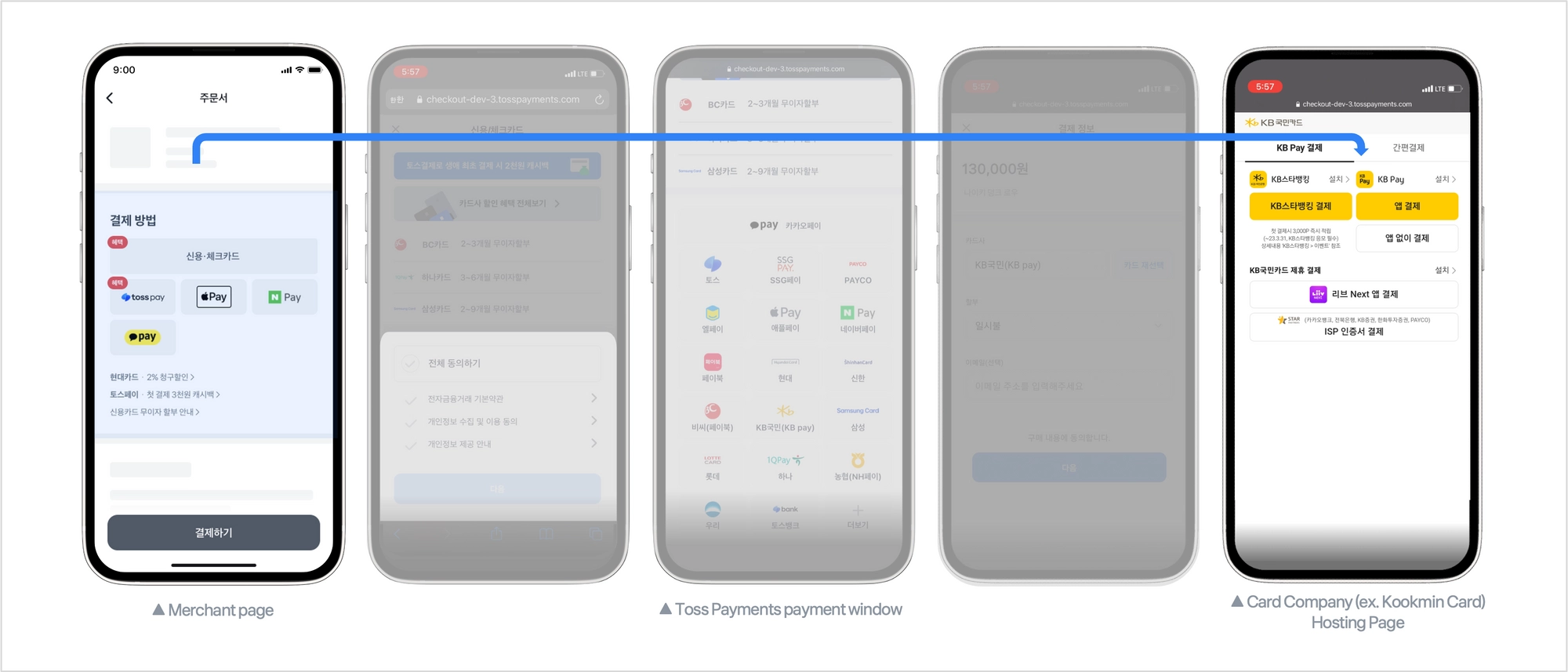
An "Card Company App" is a payment method provided by card companies on their apps. An AppCard can be used in place of a physical card for online and offline transactions.
To use an Card Company App, you must have the card company’s app installed on your phone. Install your credit/debit card app and register your card. If you're already using the card company's finance or card app, you can skip the hassle of registering, and just verify your identity and password.
At checkout, select your credit card company and choose Card Company App. The card company’s app will open, and you'll be able to pay with your Card Company App.
Here's a YouTube video of an Card Company App from Lotte Card, a South Korean credit card company.